Tools · secMeet
Video meetings without installation.
You schedule the meeting and invite people by email. Each guest gets a personal link and joins in the browser, without an account and on a phone too.
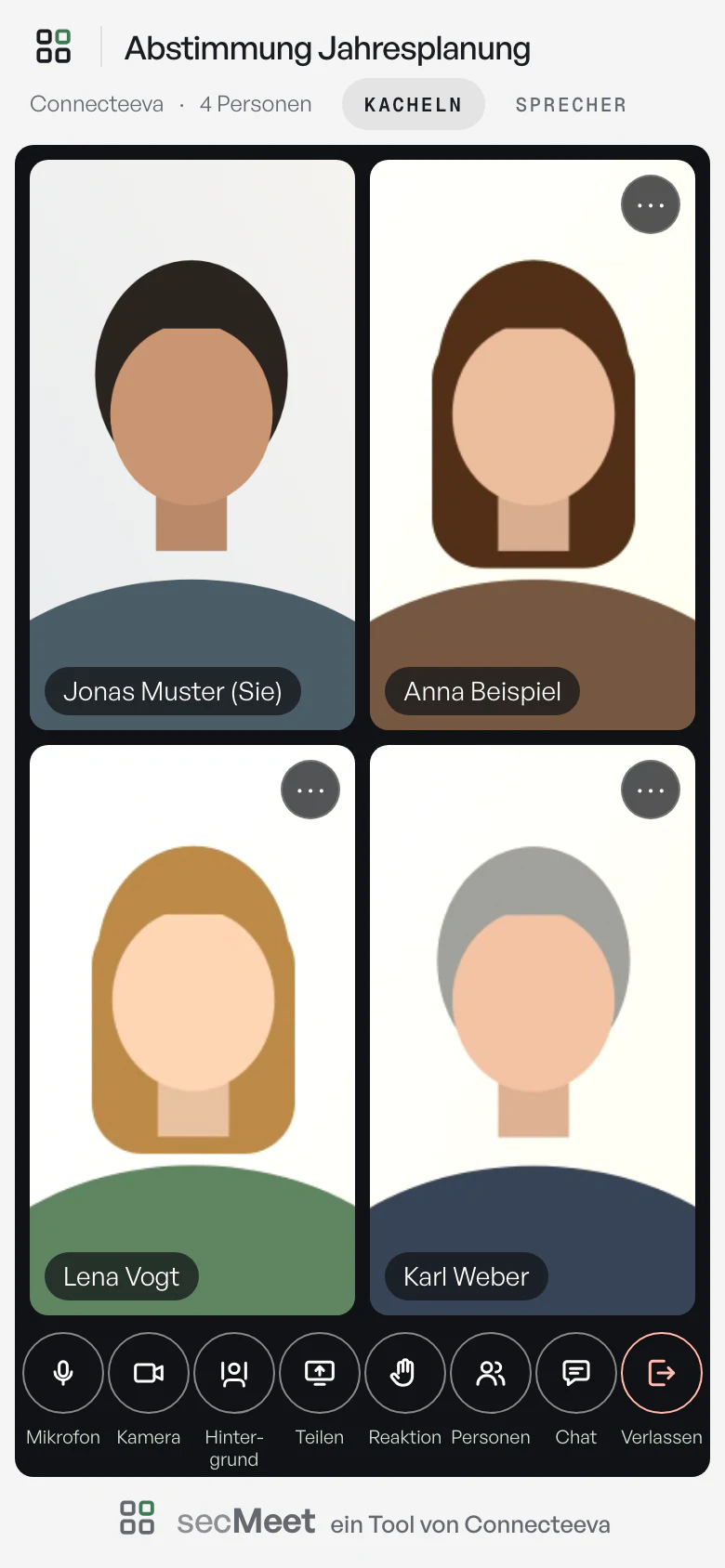
A meeting in progress

-
Raise a hand
A raised hand shows in the header and on the tile. There are also six reactions.
-
Adjust for yourself
From a tile’s menu, each person sets someone’s volume for themselves, hides their video or shows it full screen.
-
Chat and files
Messages and files up to 25 MB go to everyone currently in the room. None of it is stored.
-
Control bar
Microphone, camera, background, screen sharing, reactions, people and chat, in the same bar on a phone. You can switch microphone and speaker during the call.
How it works
From scheduling to the room.
- Schedule You enter the title, date, duration and the guests with name and email address. You are signed in with your Connecteeva identity.
- Invite Each guest receives an email with a personal link and a calendar entry. If you change the date or title, the entry changes too. A cancellation removes it.
- Check In the waiting area, guests see their own picture and the sound level. The connection check measures bandwidth in both directions and says what helps on a weak connection.
- Join The link works around the time of the meeting. You enter the room yourself from the administration, without a link.

In the room
Share your screen, choose the view.

Screen sharing
The shared screen sits large in the middle, everyone else moves to the edge as tiles. Each person can view it full screen or hide it. Whoever shares sees a preview of what goes out.
Tiles or speaker
Each person chooses whether everyone appears at the same size or the person speaking appears large.
Background
Blurred or an image. The processing happens in the browser, and your own image is not uploaded.
Host and administration
Hosts sign in with their identity.
secMeet has no password of its own. Whoever plans meetings opens the administration with the same identity as for email and files.
Host in the room
The host leads.
- Mute. The guest sees a notice and can unmute themselves.
- Remove. The guest leaves the room, and their link stops working.
- Invite. The host invites further guests from within the room, and the invitation goes out immediately.
- Transcription. The host requests it.
- End. When leaving, the host chooses whether the others carry on or the meeting ends for everyone.
In the administration
The role determines what someone sees.
- Plan. Whoever plans meetings sees and changes their own.
- Manage. Whoever has the administrator role sees all meetings, can lead any of them and sees the log of invitations.
- Attendance. After the meeting, the administration shows who was in the room and when, and the actual duration next to the planned one. Guests are told this before they join.
- End of access. If the role ends or the identity is blocked, the administration no longer opens.


Transcription
The conversation as text. Only if everyone in the room consents.
To produce minutes, the host can have the conversation converted into text. Speech recognition runs on the server of your secMeet instance.
- Request A host makes the request in the room. Everyone in the room reads the same wording and answers within one minute.
- Without consent If anyone declines or does not answer, nothing is recorded. secMeet does not show anyone who that was.
- During recording The header shows “Transcription running” to everyone. Only the microphone audio is recorded, separately for each person. Anyone who joins later consents before entering or stays outside.
- The transcript The organiser and the administrators download it as a text or Word file, with the time and name for each contribution and the list of consents.
Transcription of this meeting
The host would like to have this conversation converted into text. From now on, what is spoken into the microphones will be recorded and converted into text on the secMeet server the following night; none of it goes to other providers.
Only the organiser of the meeting and the secMeet administrators receive the text with the names of the speakers. The audio is deleted after conversion, the text 30 days after the meeting.
The conversation is only transcribed if everyone in the room consents. Your consent applies until the end of the meeting; anyone who no longer wants to be transcribed leaves the meeting.
Data protection
What secMeet stores.
Stored
- Name and email address of the guests and of the person planning the meeting
- Who was in the room and when
- A log of the invitations sent
- After a transcription, the text and who consented when
30 days after it ends, the meeting is deleted automatically, together with guests, attendance and transcript.
Not stored
- Video and audio: there is no recording. secMeet deletes the audio of a transcription after conversion.
- Chat messages: they end with the meeting.
- Files from the chat: they only go to those currently in the room.
- Your own background images: they do not leave the device.
Separate instance
A separate instance for each association, with its own database, its own media server and its own relay for networks behind strict firewalls.
No third-party services
secMeet uses only its own servers, including for setting up connections. The invitations contain no open or click tracking.
Encryption
Video, audio and chat are encrypted in transit. The audio and text of a transcription are stored encrypted.
Operation
Run by czichos.net GmbH in German data centres. We take care of updates and monitoring.
Larger groups on request. For consultations with file storage and a record, there is secConsult.
Try secMeet.
We show you the room and the administration in a trial meeting. Then we set up the separate instance for your association. The price depends on the scope.
You book secMeet for your organisation or one level, not per account. We usually reply within one working day.
Prefer to reach us directly? Send an email · call +49 30 994048000
Königsweg 220
14129 Berlin, Germany